

Microsoft 365 Tenant-to-Tenant Migration for Biotech M&A Integration
When a biotech acquisition required two Microsoft 365 environments to become one, PTP supported a secure tenant-to-tenant migration designed for business continuity, collaboration standardization, and post-merger IT integration. The project included more than 200 users, 500+ shared mailboxes, Microsoft Teams, SharePoint, OneDrive, Exchange Online, and multiple custom domains, helping the merged organization move to a unified Microsoft 365 tenant without major disruption.

Life sciences organization with collaboration, security, and continuity requirements.
Employees and stakeholders requiring access to a unified Microsoft 365 environment.
Multiple Microsoft 365 tenants hosting several customer domains across the organization.
Consolidate platforms, standardize collaboration, and reduce complexity after acquisition.
The Microsoft 365 Tenant-to-Tenant Migration Challenge
After the acquisition, the biotech organization needed to consolidate separate Microsoft 365 environments while preserving collaboration, mail flow, custom domain access, and business continuity throughout the migration.
- Multiple Microsoft 365 tenants with several custom domains that needed to be unified into one collaboration environment.
- Complex Microsoft Teams, SharePoint, OneDrive, permissions, and collaboration dependencies across the source and destination tenants.
- Minimal acceptable downtime due to business continuity requirements for users, mailboxes, shared mailboxes, and collaboration workflows.
- The need to maintain cross-tenant coexistence during the phased Microsoft 365 tenant-to-tenant migration.
The Solution: Phased Microsoft 365 Tenant Consolidation
PTP implemented a phased Microsoft 365 tenant-to-tenant migration strategy to consolidate collaboration platforms after the biotech acquisition. The solution used cross-tenant coexistence, Exchange Online migration, Microsoft Teams migration, SharePoint migration, OneDrive migration, and AvePoint Fly Server hosted in an AWS VPC to support secure migration orchestration and business continuity.
Microsoft 365 Tenant-to-Tenant Migration Architecture
The architecture connected the source and destination Microsoft 365 tenants through AvePoint Fly Server hosted in the customer-controlled AWS Cloud VPC. This enabled secure movement of Exchange Online, SharePoint Online, OneDrive for Business, and Microsoft Teams data while using Microsoft Graph API, SharePoint API, EWS, and HTTPS-based connectivity.
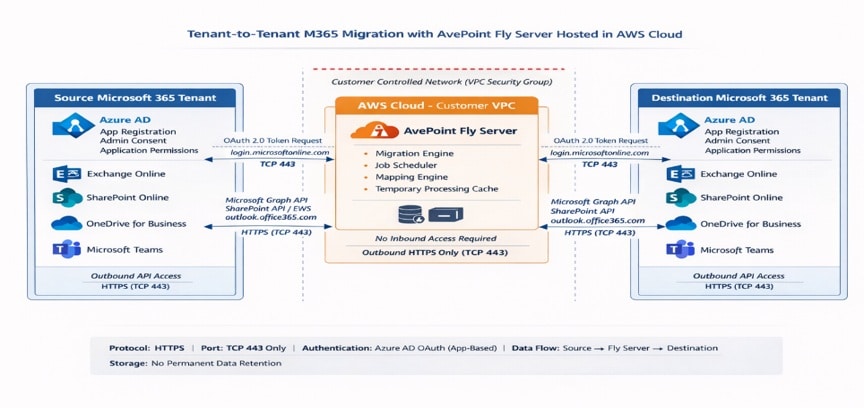
Secure Migration Architecture
- Source and destination Microsoft 365 tenants connected through AvePoint Fly Server hosted in a customer-controlled AWS VPC.
- Exchange Online, SharePoint Online, OneDrive for Business, and Microsoft Teams included in the migration scope.
- Microsoft Entra ID application registration, admin consent, and application permissions supported authentication and access.
- Microsoft Graph API, SharePoint API, and EWS supported data access between the source tenant, migration server, and destination tenant.
- HTTPS and TLS 1.2+ encryption supported secure data transfer, with outbound HTTPS traffic only through TCP 443.
- No inbound access and no permanent data retention were required in the migration architecture.
Key Microsoft 365 Migration Components
The migration program combined Microsoft 365 tenant administration, secure identity configuration, application-based OAuth authentication, and automated migration tooling to support a controlled consolidation across the merged organizations.
- Source and destination M365 tenants: Microsoft 365 environments containing users, mailboxes, shared mailboxes, Teams, SharePoint sites, OneDrive data, and custom domains.
- AvePoint Fly Server hosted on AWS VPC: Migration platform used to orchestrate data movement between the source and destination tenants.
- Entra ID app with admin consent: Application permissions through Microsoft Graph API supported secure tenant access.
- Application-based OAuth authentication: Authentication model used to support secure, governed migration access.
- HTTPS and TLS 1.2+ encryption: Security layer used to protect data transfer during the Microsoft 365 tenant migration.
Implementation Approach: Staged, Dependency-Aligned, Phased Migration
PTP followed a staged migration approach designed to reduce risk, validate migration scenarios, preserve permissions and references, and maintain controlled coexistence during the Microsoft 365 tenant consolidation.
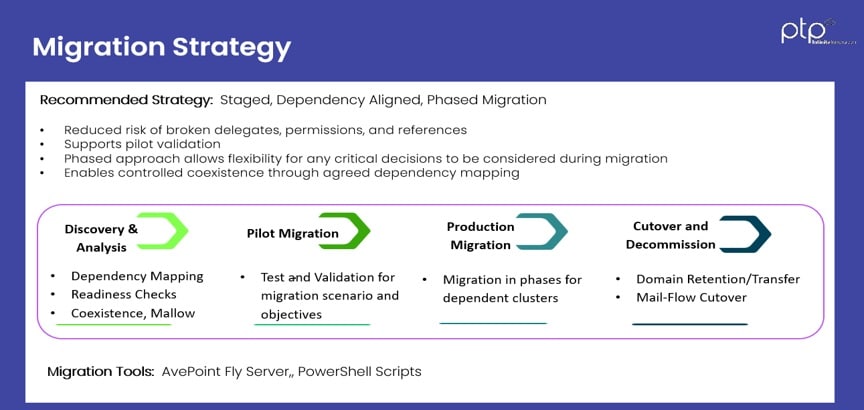
Migration Strategy Phases
- Discovery and analysis: Dependency mapping, readiness checks, coexistence planning, and mail flow review.
- Pilot migration: Testing and validation of the migration scenario, objectives, permissions, and user experience.
- Production migration: Migration in phases for dependent user groups, collaboration clusters, mailboxes, Teams, SharePoint, and OneDrive content.
- Cutover and decommission: Domain retention or transfer, mail-flow cutover, and decommissioning of legacy tenant dependencies.
Migration Tools
- AvePoint Fly Server for Microsoft 365 tenant-to-tenant migration orchestration.
- PowerShell scripts to support automation, validation, and migration administration.
Microsoft 365 Migration Outcomes
The phased Microsoft 365 tenant-to-tenant migration helped the merged biotech organization standardize collaboration, consolidate users and shared mailboxes, and move critical SharePoint and OneDrive data into a unified Microsoft 365 environment with no major business disruption.
Employees were moved into the consolidated Microsoft 365 tenant to support unified collaboration.
Shared mailbox data was migrated to support continuity across teams and business functions.
Collaboration and user file data were moved into the destination Microsoft 365 environment.
The phased migration strategy helped preserve productivity throughout the post-merger IT integration.
Why PTP for Microsoft 365 Tenant-to-Tenant Migration
For biotech and life sciences organizations managing post-merger IT integration, a Microsoft 365 tenant-to-tenant migration requires more than data movement. PTP combines M&A migration planning, secure migration orchestration, executive communication, and a minimal downtime framework to help organizations consolidate collaboration environments with confidence.
- Proven M&A migration methodology: PTP uses a structured approach for post-merger Microsoft 365 consolidation, helping align users, domains, mailboxes, Teams, SharePoint, and OneDrive data into a unified tenant.
- Automated migration orchestration: Automated tooling and migration workflows help reduce manual effort, improve consistency, and support phased Microsoft 365 tenant migration across complex environments.
- Executive-focused migration support: PTP supports planning, communication, and stakeholder visibility so leadership can understand migration progress, risks, milestones, and business impact.
- Security-first integration approach: The migration strategy prioritizes secure authentication, governed access, encrypted data transfer, and controlled coexistence between Microsoft 365 tenants.
- Minimal downtime migration framework: A phased migration model helps preserve business continuity, reduce user disruption, and maintain collaboration access throughout the Microsoft 365 tenant-to-tenant migration.

Ready to Consolidate Microsoft 365 After M&A?
PTP helps biotech and life sciences organizations plan, secure, and execute Microsoft 365 tenant-to-tenant migrations with minimal disruption to users, mailboxes, Teams, SharePoint, and OneDrive.
Schedule your free consultation today.
Tell us a bit about your project to get started with PTP. Fill out the form below and our team will be in touch shortly.
FAQs About Microsoft 365 Tenant-to-Tenant Migration
What is a Microsoft 365 tenant-to-tenant migration?
A Microsoft 365 tenant-to-tenant migration is the process of moving users, mailboxes, shared mailboxes, Microsoft Teams, SharePoint sites, OneDrive data, permissions, and domains from one Microsoft 365 tenant to another. Organizations often need this type of migration after a merger, acquisition, divestiture, or business restructuring that requires separate collaboration environments to be consolidated into one unified tenant.
Why do biotech companies need Microsoft 365 tenant migration after M&A?
Biotech and life sciences companies often need Microsoft 365 tenant migration after M&A to standardize collaboration, consolidate users and domains, simplify IT management, and reduce disruption across merged teams. A post-merger Microsoft 365 consolidation helps employees work from one environment for email, file sharing, Teams collaboration, SharePoint sites, and OneDrive content.
What Microsoft 365 services are included in a tenant-to-tenant migration?
A Microsoft 365 tenant-to-tenant migration can include Exchange Online mailboxes, shared mailboxes, Microsoft Teams, SharePoint Online sites, OneDrive for Business data, Microsoft 365 groups, user accounts, custom domains, permissions, and collaboration settings. The exact scope depends on the source tenant, destination tenant, business requirements, and coexistence needs during migration.
How can downtime be reduced during a Microsoft 365 tenant migration?
Downtime can be reduced during a Microsoft 365 tenant migration by using a phased migration strategy, dependency mapping, readiness checks, pilot testing, cross-tenant coexistence, mail flow planning, and controlled cutover. This approach helps organizations validate migration steps before production migration and maintain access to email, Teams, SharePoint, and OneDrive during the transition.
What is cross-tenant coexistence in Microsoft 365 migration?
Cross-tenant coexistence allows users in different Microsoft 365 tenants to continue working during a phased migration. It helps preserve collaboration, communication, mail flow, access, and business continuity while users, mailboxes, Teams, SharePoint sites, OneDrive data, and custom domains are gradually moved from the source tenant to the destination tenant.
How does PTP support secure Microsoft 365 tenant-to-tenant migration?
PTP supports secure Microsoft 365 tenant-to-tenant migration through structured M&A migration planning, secure migration orchestration, Microsoft Entra ID application-based authentication, admin consent, Microsoft Graph API permissions, HTTPS and TLS 1.2+ encryption, and phased cutover planning. For this case study, AvePoint Fly Server hosted in an AWS VPC helped support secure migration of Exchange Online, Microsoft Teams, SharePoint, and OneDrive data.